Yes, the ACT has Desmos, but only online: since the December 2025 test, the online ACT (the digital ACT) has had the Desmos graphing calculator built into the Math section. The paper ACT has no Desmos, so paper testers bring their own calculator. In our view, paper is still the better format for most students. Desmos matters if you test online, and it can be a reason for a student whose Math score is lower than the other section scores to add an online test date. Below: what the ACT version of Desmos does, the eight moves we teach, and whether to switch.
Is Desmos on the ACT?
Yes, on the online ACT, and only in the Math section. ACT’s calculator policy page puts it plainly: “Students taking the ACT online have access to the Desmos graphing calculator built into the testing platform during the Math section.”
Where it is: the Math section’s TOOLS menu, as “Desmos Graphing Calculator”; the calculator button works only during Math.
You may still bring your own permitted calculator on the digital ACT, as ACT’s test day page says: “you may bring your own.”
You take the online ACT at a test center, never at home, on a computer the center provides or on an approved laptop you bring (ACT calls this BYOD). It runs on every national test date, but only at centers that offer online testing. The national online ACT got Desmos with the December 2025 test. Before that, its built-in calculator was a basic one, not a graphing one. School-day (state and district) online testing had Desmos earlier, from the 2024-2025 school year; a school-day test given on paper has no Desmos.
Can You Use Desmos on the Paper ACT?
No. The paper ACT is a booklet and a bubble answer sheet, with no on-screen calculator. You bring your own permitted handheld calculator (testing staff do not provide one). Phones, tablets and laptops are banned, so there is no opening desmos.com on your own device either. The ACT calculator policy in brief:
- Any four-function, scientific or graphing calculator is allowed on Math unless it has a computer algebra system (CAS).
- Banned: all TI-89 and TI-92 models, the TI-Nspire CAS, the HP Prime, HP 48GII, HP 40G, 49G and 50G, the Casio ClassPad 300, 330 and fx-CP400, Algebra fx 2.0 and CFX-9970G, and calculators with QWERTY keys or pen input (the Sharp EL 9600 is allowed).
- The TI-84 family is fine (ACT, on its calculator videos page: “Yes, TI-84 calculators are allowed on the ACT.”), as is the non-CAS TI-Nspire.
- Math only, never Science, no sharing, and “all problems may be solved without one.”
What Is the ACT Version of Desmos?
The ACT Desmos calculator is the regular Desmos graphing calculator with a short list of features switched off. Desmos publishes a free practice copy, no login needed, at desmos.com/testing/digital-act/graphing, listed on its testing page as “Graphing Calculator, ACT Version”.
We tested it. What differs from desmos.com:
- It starts in degrees (desmos.com starts in radians); a question in radians needs the Radians switch in the wrench (settings) menu at the top right of the graph.
- sec, csc and cot are off, with their inverses: type
1/cos(x),1/sin(x)and1/tan(x)instead. - Three statistics functions are off (mad, cov and covp); mean, median, min, max, stdev, stdevp, total, var, corr and quartile all work.
- No images, folders or notes, and the audio tone feature is off.
- No matrix tool, so matrix questions are done by hand or on a handheld.
- Complex Mode is off by default (a switch in the wrench menu). With it off,
sqrt(-4)shows “undefined” and i is just a letter; with it on, the calculator also flips to radians (more on that in move 7).
Everything else a student would use on the ACT works as on desmos.com: regressions, tables, sliders, lists, inequalities, absolute value, function notation, the gray points that mark intercepts and crossings when you click a graph, nCr, nPr and factorials. Typing is the same: ^ makes an exponent, / a fraction, ~ a regression, and y1 becomes a subscript that matches a table column.
Desmos publishes a one-page reference sheet for each test and usually updates it once a year, over the summer; the list above is the 2026-2027 version.
Is the ACT’s Desmos the Same as the SAT®’s?
Same calculator, different settings. The SAT version, inside the Bluebook testing app, starts in radians, turns off no functions, adds a scientific calculator behind a toggle, and switches on Log mode for you on exponential, logarithmic and power regressions. It is available for the entire SAT Math section (College Board’s calculator policy). If you know one, you know the other; on the ACT, just remember degree mode and the missing sec, csc and cot. More in our post on the advantages of Desmos on the SAT.
How to Use Desmos on the ACT: 8 Moves That Save Time
These eight moves are what the ACT Desmos calculator is good for, and the ones we teach first. Every example below was tested in the ACT practice calculator, so you can copy it exactly. ACT also publishes 12 free short videos on Desmos for ACT Math and says to practice in Online Practice Test 1, one of its four free online practice tests.
1. How Do You Solve an Equation in Desmos?
Type each side of the equation as its own line starting with y=, then click where the two graphs cross. When you will meet it: any “solve for x” question.
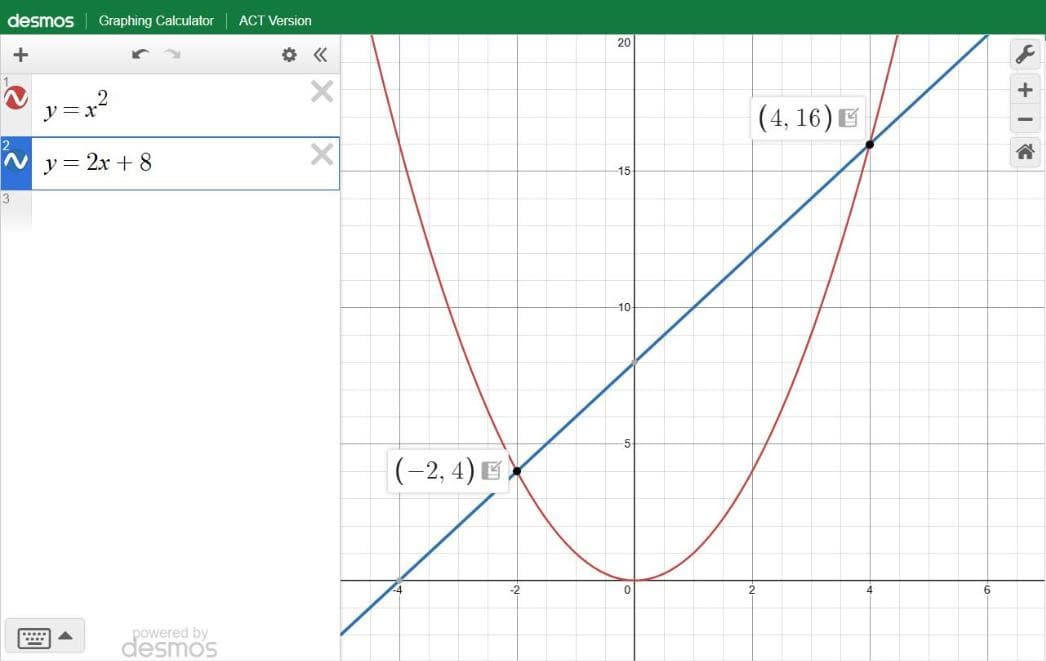
Type: y=x^2 and y=2x+8 to solve x^2 = 2x + 8.
What you will see: crossings at (4, 16) and (-2, 4), so x = 4 or x = -2. For |2x-3| = 7, type y=|2x-3| and y=7: the crossings sit at x = 5 and x = -2.
The mistake: reading the wrong coordinate; x is the first number in each pair (hover over a gray crossing point to see it).
2. How Do You Solve a System of Equations in Desmos?
Type both equations as the question prints them and click the point where the two lines cross. When you will meet it: two equations, two unknowns, asking for x, y or both. In our experience this is the clearest Desmos win on ACT Math.
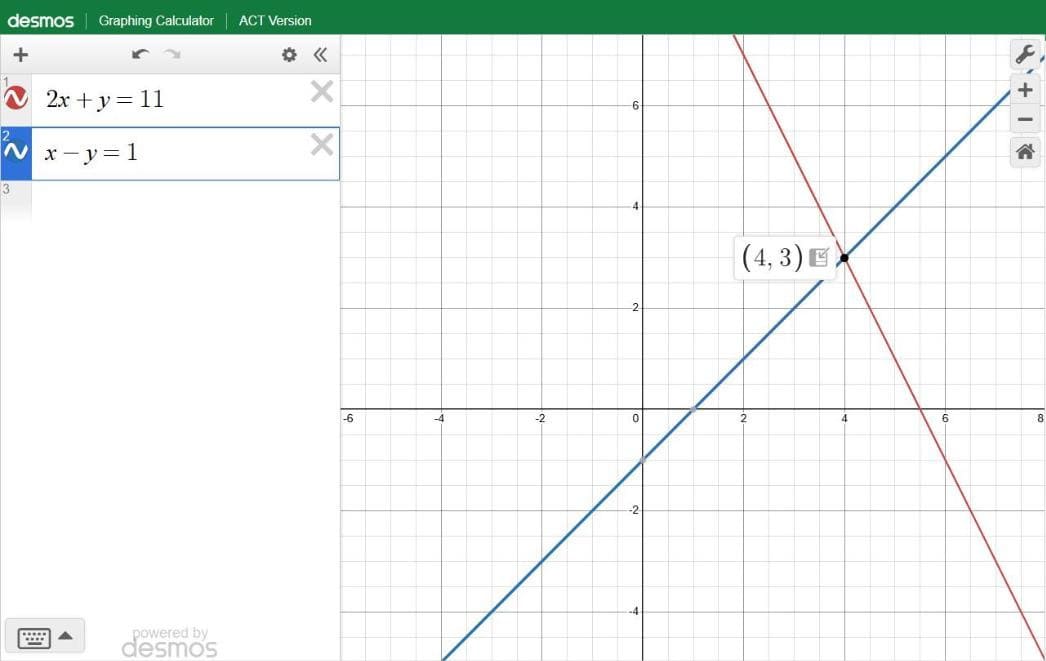
Type: 2x+y=11 and x-y=1; Desmos graphs 2x + y = 11 without rearranging.
What you will see: two lines crossing at (4, 3), so x = 4 and y = 3.
3. How Do You Find the Vertex and Zeros of a Parabola?
Type the equation and click the curve: gray points mark the zeros, the y-intercept and the vertex. When you will meet it: a quadratic question about roots, intercepts or the maximum or minimum value.
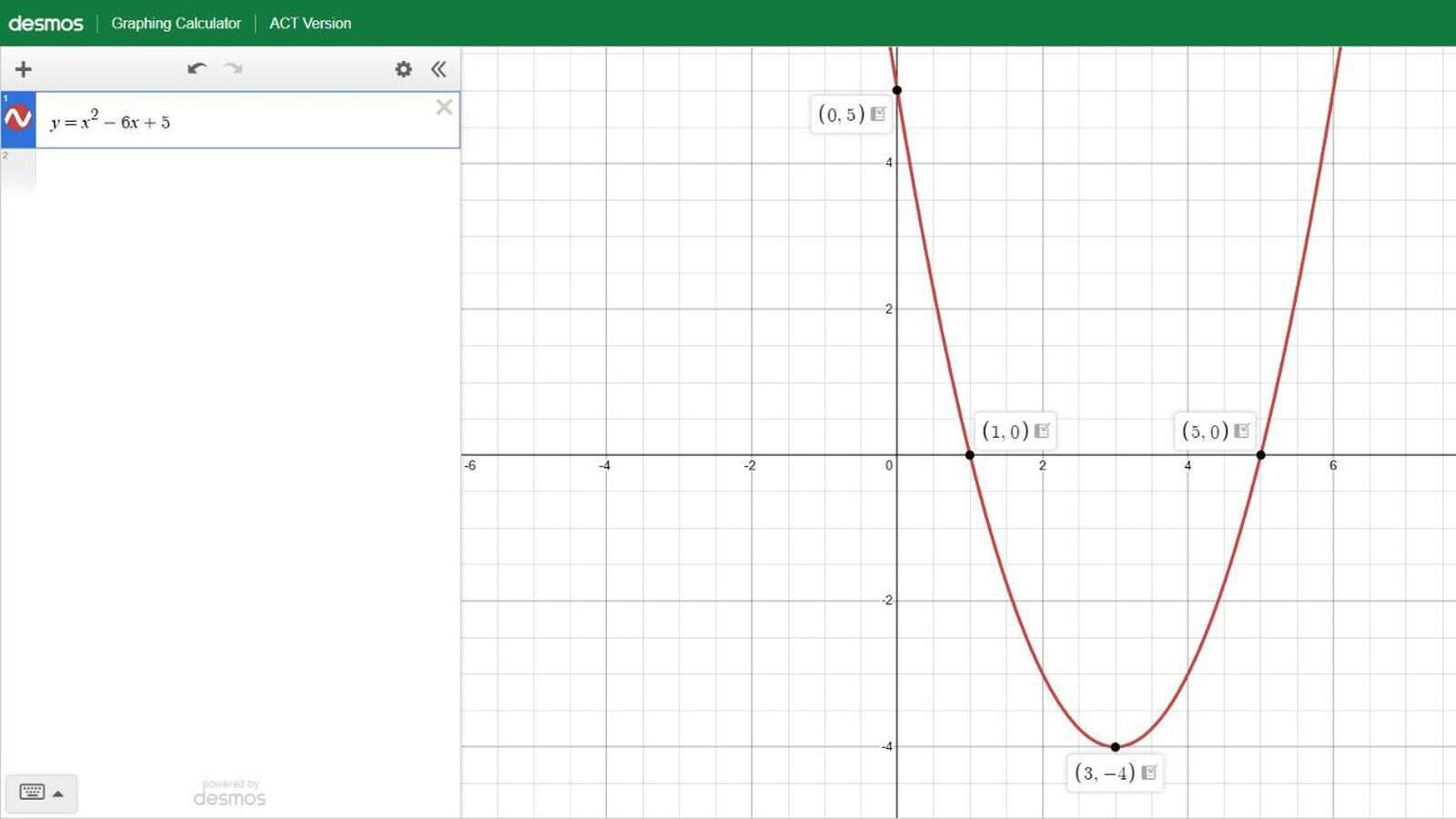
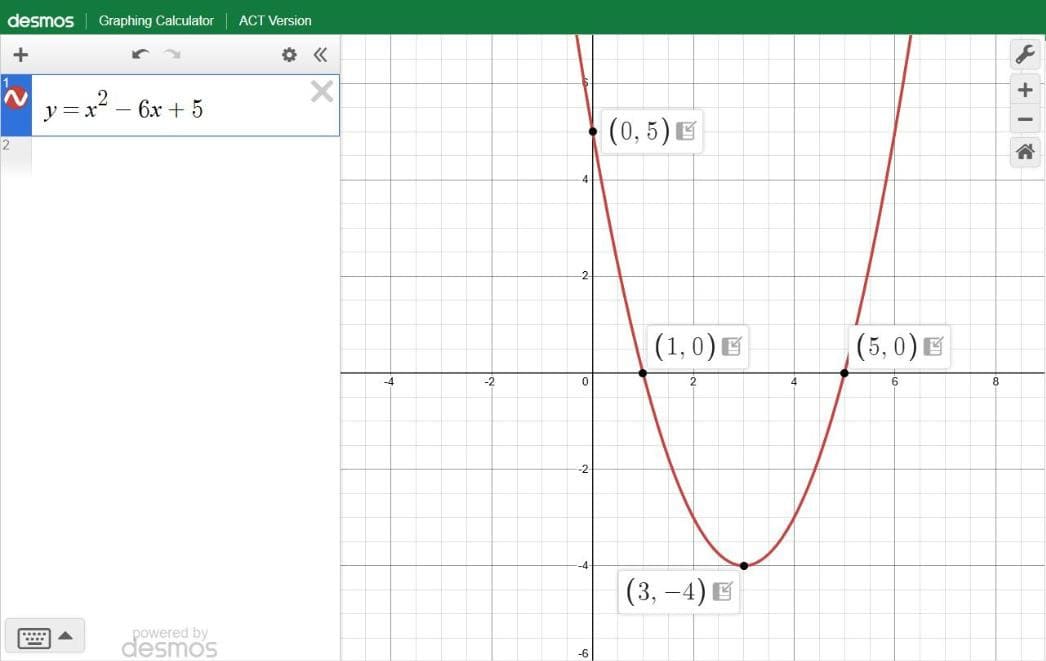
Type: y=x^2-6x+5, then click the curve.
What you will see: gray points at the x-intercepts (1, 0) and (5, 0), the y-intercept (0, 5) and the lowest point, the vertex, at (3, -4).
The mistake: not clicking. The gray points appear when you click the graph, not when the parabola draws.
4. How Do You Find the Equation From a Table of Points?
Put the points in a table, then type the model with ~ instead of =. When you will meet it: a table or a few points and a question about the equation, the slope or a missing value.
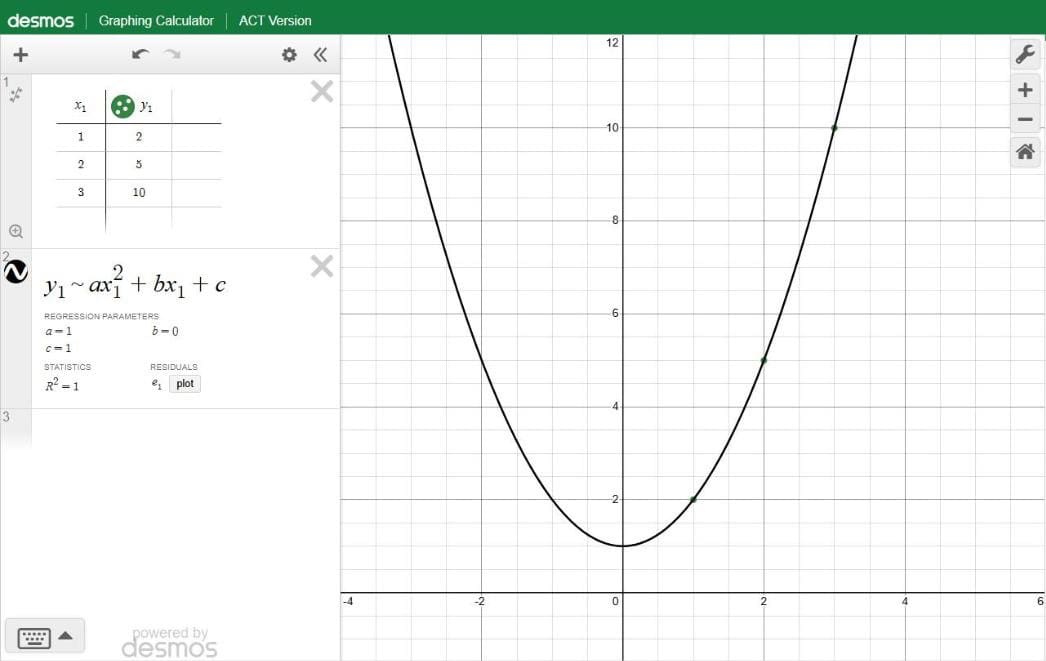
Type: click the + button and add a table, then enter the points (1, 2), (2, 5) and (3, 10); the columns are named x1 and y1. On a new line, type y1~ax1^2+bx1+c (that is the ~ key, not =).
What you will see: a = 1, b = 0 and c = 1, so y = x^2 + 1. For a line through two points, y1~mx1+b with (1, 3) and (4, 9) gives m = 2 and b = 1.
The mistake: typing = instead of ~. The tilde tells Desmos to find the equation for you.
5. How Do You Evaluate and Compose Functions?
Define the function once with f(x)=, then ask for any value, such as f(4), on the next line. When you will meet it: “What is f(4)?”, “What is f(g(2))?”, or “Which expression is equivalent?”
Type: f(x)=2x^2-3x+1 on one line, then f(4) on the next.
What you will see: 21. For composition, add g(x)=x+2 and then f(g(2)): g(2) is 4, so 21 again. For “which is equivalent”, graph the original and an answer choice; identical graphs mean equivalent expressions.
6. How Do You Do Trig Questions on the ACT Desmos?
Type the expression as written, but check the angle mode first. When you will meet it: any trig question, from SOHCAHTOA to the unit circle.
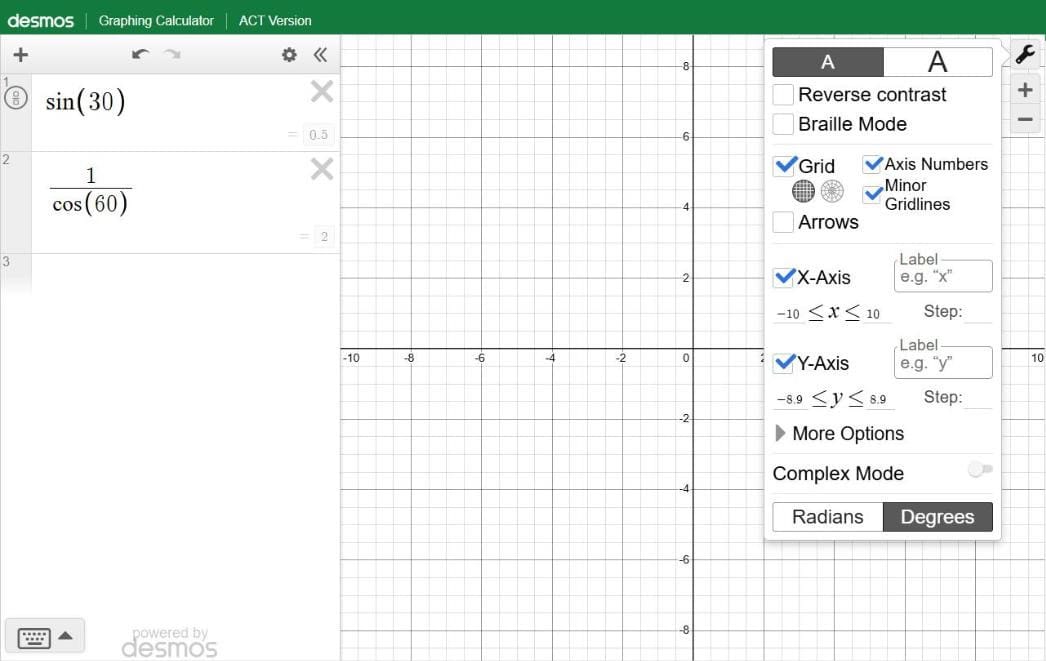
Type: sin(30).
What you will see: 0.5, with no setup, because the ACT version starts in degrees.
The mistake, and it is the big one: a radians question. In degree mode sin(pi) returns 0.0548 (pi is read as pi degrees), so open the wrench (settings) menu at the top right of the graph and click Radians first. The second trap: sec, csc and cot are off, so type 1/cos(60) instead of sec(60).
7. How Do You Do Complex Numbers on the ACT Desmos?
Switch on Complex Mode in the wrench menu first; then i works like a number. When you will meet it: a question with i in it.
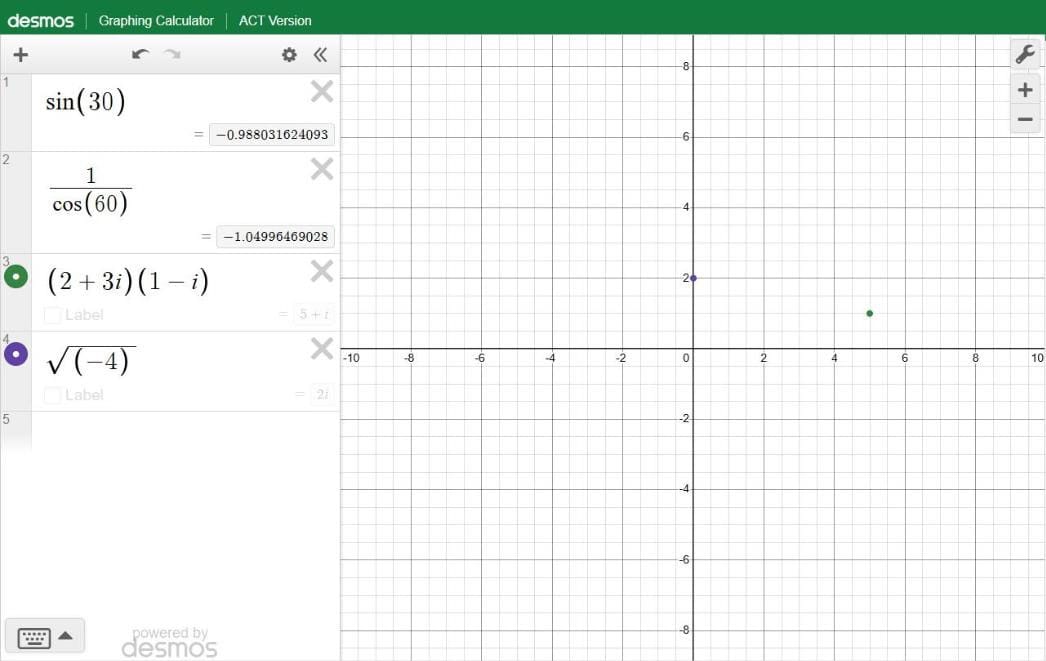
Type: (2+3i)(1-i), with Complex Mode on.
What you will see: 5 + i. With the switch on, sqrt(-4) gives 2i.
The mistake: forgetting the switch. With Complex Mode off, i is just a letter and sqrt(-4) comes back “undefined”.
Warning: Complex Mode also switches the calculator to radians (Desmos’s help: it “switches all angles to radians”). In our test, sin(30) changed from 0.5 to -0.988 the moment Complex Mode went on, so switch it off again, or click Degrees, before the next trig question.
8. How Do You Find the Mean, Median and Combinations?
Type mean, median or stdev with the numbers in square brackets inside the parentheses; nCr and ! handle the counting. When you will meet it: mean, median, standard deviation, combinations and factorials.
Type: mean([82,90,76,95,87]) and median([82,90,76,95,87]); nCr(10,3) for combinations; 5! for a factorial.
What you will see: 86, 87, and 120 for both nCr(10,3) and 5!. For a standard deviation, type stdev([82,90,76,95,87]) with the same list.
The mistake: leaving out the square brackets, or putting them outside the parentheses.
How Desmos Can Help on the Digital ACT Math
Desmos is most useful on three kinds of question:
- Graphs and intersections of functions
- Quadratics and parabolas (vertices, roots, maximum and minimum values)
- Equations that are tedious to solve algebraically but easy to check graphically
Our estimate: almost every ACT Math section has a few questions that go much faster in Desmos, if the student knows the moves above. It is less of a game-changer on the ACT than on the SAT, though: ACT Math questions are more straightforward, and there are 45 of them in 50 minutes on the enhanced ACT.
What Desmos will not do: matrices, algebra in symbols (it is not a computer algebra system), word problems, geometry figures, or the careful reading of the question. ACT says every Math problem can be solved without a calculator.
The calculator can’t choose the formula for you either. Our guide to ACT Math formulas and what to study first covers the relationships to know and the condition behind each one.
Digital vs. Paper ACT
Desmos changes one part of the online ACT (Math) and leaves the bigger tradeoffs where they were.
Small advantages to the digital ACT:
- No bubbling (you click your answer).
- The three-section online test is scheduled to end 20 minutes earlier than paper (same time on the questions; the paper test takes longer to bubble and collect), and online scores usually come out about five days sooner.
- An integrated timer and on-screen tools (highlighter, answer masking, option eliminator, mark for review, line reader, magnifier).
- Desmos on Math.
- Scratch paper is usually provided online (ACT says testers “may be provided with” it); on paper it is not permitted.
Significant advantages to the paper ACT:
- Practice material: our library holds dozens of official past paper ACTs (older timing, same content), compared with ACT’s four free online practice tests.
- You write in the booklet: underline, circle and annotate as you read, and draw on Math and Science diagrams instead of recreating them on scratch paper.
- On Reading and Science, you see a whole passage or data set at once, with no scrolling between text, charts and questions; in our experience this matters more than it sounds.
- Scoring: on three recent test dates (October 2025, April 2026 and June 2026) the paper and online versions shared every scored question, so we compared their score tables. At the same number of right answers, the paper table gave the same or a higher Math score at 62 of the 63 raw scores we compared, and a point higher at 32 of them; in Reading it was higher at 33 of 45, by one point and sometimes two. ACT equates the two formats so that scores are “comparable, regardless of testing conditions” and would call the gap an adjustment for the online format; in plain terms, a student who gets the same questions right scores a little higher on paper.
Overall, paper holds clear advantages. Desmos opens one specific strategy, walked through next: English and Reading on paper first, then, if Math is still the weak spot, a second test online on a later date, combined by superscoring.
If you’re still choosing between the exams, our guide explains how to choose between the SAT and ACT.
Should Students Switch to the Digital ACT for Desmos?
For most students, no: the paper advantages above outweigh a better calculator on one section.
The exception: a student whose Math score is lower than the other sections. To be clear first: you cannot take English and Reading on paper and Math online on the same day, because a registration is one format for every section, so this plan means two test dates and two registration fees. The plan, in order:
- Take the paper ACT and secure strong English and Reading scores (and Science, if a target college wants it).
- If Math is still behind, learn the ACT version of Desmos (the eight moves above are the core of it) and register for the online ACT on a later test date.
- Let superscoring combine the two tests: ACT builds a Superscore automatically from your highest English, Math and Reading scores, which “can come from ANY test event”. ACT’s rule does not single out paper or online, so, as we read it, a paper test and an online test combine.
The rules: you choose paper, online or BYOD when you register and can change it only until the late registration deadline, for a fee and if a seat is available (online testing page). ACT will not report scores from two tests taken on the same date, so the online test has to be a later date.
Many colleges superscore the ACT, and our list shows which; ACT’s Superscore FAQ page puts it as “Not every college superscores the ACT, but the number that do is growing.” See also what scores colleges see.
Science is optional (a $5 add-on). Since 2025 it sits outside the Composite, which is the average of English, Math and Reading, and outside the Superscore (ACT’s understanding your scores page). If you take it, it must be on the same day as the other sections. Our advice, not ACT’s: typically only students with a Composite of 30 or above need to worry about colleges that prefer a Science score (do colleges use ACT Science scores?).
When Did the ACT Add Desmos?
The national online ACT has had Desmos since the December 2025 test (Saturday, December 13, 2025), which ACT announced in November 2025. State and district online ACT testing, given on school days, already had it in the 2024-2025 school year, and in early 2025 ACT said it was “working to integrate it into our Saturday online testing.” It remains in place for 2026-2027, the school year covered by Desmos’s current ACT reference sheet.
Frequently Asked Questions
Is Desmos allowed on the ACT?
Yes: ACT builds it into the online ACT’s Math section, on national test dates and on school-day (state and district) online tests alike. The paper ACT has no Desmos, and phones, tablets and laptops are banned.
Do you still need a handheld calculator for the online ACT?
No, but you may bring one, and we recommend a familiar handheld as a backup; it also covers matrix questions, which the ACT Desmos cannot do.
Does the digital ACT have Desmos, and where is it?
Yes. On the online ACT it sits in the Math section’s TOOLS menu, as “Desmos Graphing Calculator”; the button works only during Math.
Is the ACT Desmos in degrees or radians?
Degrees by default (desmos.com starts in radians); for a radians question, click Radians in the wrench menu.
Can you use regression on the ACT Desmos?
Yes: table first, then the model with ~ in place of = (or click Add Regression); linear, quadratic and exponential regressions all worked in our tests.
Can you use a calculator on ACT Science?
No. Calculators, Desmos included, are allowed only on the Math section.
Can you switch your registration from paper to online?
Yes, until the late registration deadline, for a fee and if a seat is available at a center that offers online testing, never at the test center on test day.
Where can you practice with the ACT Desmos calculator?
In Desmos’s free practice copy of the ACT version, configured to match the test, and in ACT’s free online practice tests; ACT’s 12 short videos, linked above, cover several of the same moves.
Questions? Reach out to us anytime. We teach Desmos for the SAT (our Desmos SAT calculator bootcamp and SAT Desmos post) and how to use Desmos on the ACT in one-on-one ACT tutoring, in person in New Jersey or online for students anywhere, starting with these eight moves. Take a proctored practice ACT with us, and read our essential strategies for the enhanced ACT.